

The problem
Claude Code persists context viaCLAUDE.md files. But this mechanism has two limits:
-
It doesn’t scale in size.
CLAUDE.mdis injected into the system prompt, which means it eats into the context window. The more rules you add, the less room the agent has to work. The Context Graph stores knowledge externally and the agent queries only what it needs. - It’s siloed per engineer. When one engineer defines coding rules in their agent, the rest of the team never sees them. Scale that to 10 engineers running parallel agents, and you get 10 diverging sets of conventions. Each agent “remembers,” but none of them share.
How Rippletide Code fixes this
Rippletide Code gives Claude Code persistent, structured memory backed by a Context Graph. Instead of re-explaining your conventions every session, you store them once. Every agent session reads from the same source of truth. The graph stores your engineering standards:- Naming conventions —
camelCasefor variables,PascalCasefor components,UPPER_SNAKE_CASEfor constants - Architectural patterns — where to put hooks, how to structure API routes, which state management to use
- Design system rules — approved components, spacing tokens, color usage
- Error handling policies — how to handle API failures, logging standards, retry strategies
What you get
Rippletide Code covers five areas:Integration
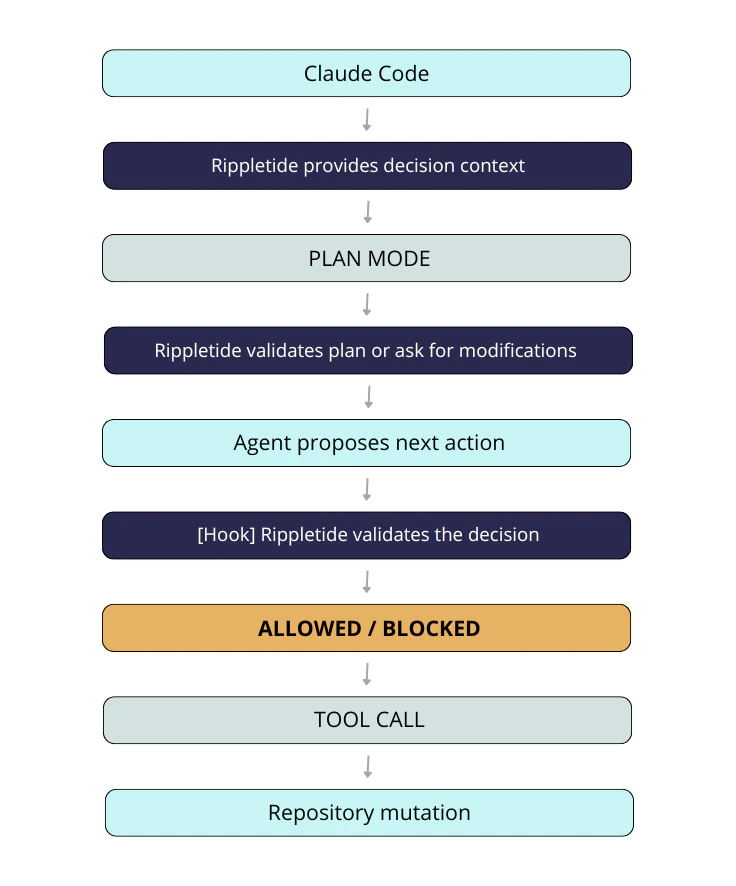
Rippletide integrates with Claude Code through hooks — shell commands that run automatically at key points during the agent session. Theconnect command sets up these hooks so the Context Graph is queried seamlessly, without any manual intervention.
Two hooks run during every coding session:
fetch-rules.sh(UserPromptSubmit) — fires on every prompt, queries the backend with the user’s request, and injects relevant rules into Claude’s contextcheck-code.sh(PreToolUse) — fires before every Edit/Write, sends the proposed code to the backend for violation checking, and blocks the tool call if violations are found
Data privacy
Rippletide only relies on the context available inside your local Claude Code workflow:- the current Claude Code chat session for the active project
- your
CLAUDE.md
Next steps
Connect
Set up Rippletide Code in your project
Coding Session
How rules are enforced while you code
Rule Management
Add, edit, and delete rules with natural language
Rule Sharing
Share rules with teammates
Planning
Generate rule-compliant implementation plans
Team Governance
Scale conventions across engineers and repositories