> ## Documentation Index
> Fetch the complete documentation index at: https://docs.rippletide.com/llms.txt
> Use this file to discover all available pages before exploring further.
# Amazon Bedrock Integration
> Bring your Amazon Bedrock knowledge bases into Rippletide to monitor, evaluate, and secure your AI agents
Already using Amazon Bedrock to power your AI agents? Rippletide lets you connect your existing Bedrock knowledge bases to add guardrails, monitoring, and evaluation without changing your AWS infrastructure.
## What You Get
By connecting your Bedrock knowledge bases to Rippletide, you can:
* **Visualize** your knowledge base as an interactive context graph
* **Define processes** and workflows on top of your existing data
* **Add guardrails** to enforce safety and compliance rules
* **Test and evaluate** your agent's responses before going live
* **Deploy via MCP** to plug your agent into any MCP-compatible client
## Prerequisites
* An Amazon Bedrock Knowledge Base (active, with data sources)
* AWS credentials with the required permissions (see below)
* A [Rippletide account](https://app.rippletide.com/)
## Step 1: Prepare Your AWS Credentials
Gather the following from your AWS account:
* **AWS Access Key ID**
* **AWS Secret Access Key**
* **AWS Region** where your knowledge base is deployed (e.g., `us-east-1`)
* **Knowledge Base ID** (found in the Bedrock console)
### Required IAM Permissions
The IAM user or role associated with your credentials needs the following permissions:
```json theme={null}
{
"Version": "2012-10-17",
"Statement": [
{
"Effect": "Allow",
"Action": [
"bedrock:GetKnowledgeBase",
"bedrock:ListKnowledgeBases",
"bedrock:RetrieveAndGenerate"
],
"Resource": "*"
}
]
}
```
## Step 2: Create an Agent on Rippletide
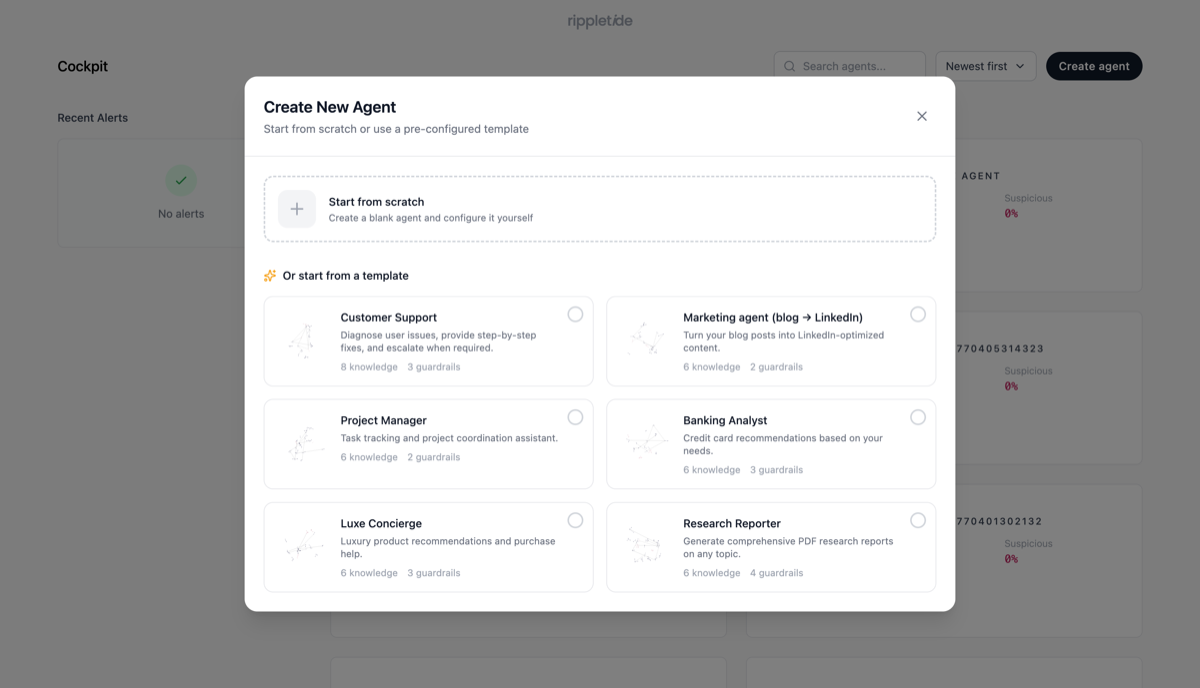
1. Go to [app.rippletide.com](https://app.rippletide.com/) and sign in
2. Click **"Create Agent"** then **"Start from scratch"**
3. Give your agent a name and click **"Continue to Knowledge"**
 ## Step 3: Connect Your Bedrock Knowledge Base
1. In the Knowledge section, select **"Other Connectors"**
2. Choose **"AWS Bedrock"**
## Step 3: Connect Your Bedrock Knowledge Base
1. In the Knowledge section, select **"Other Connectors"**
2. Choose **"AWS Bedrock"**
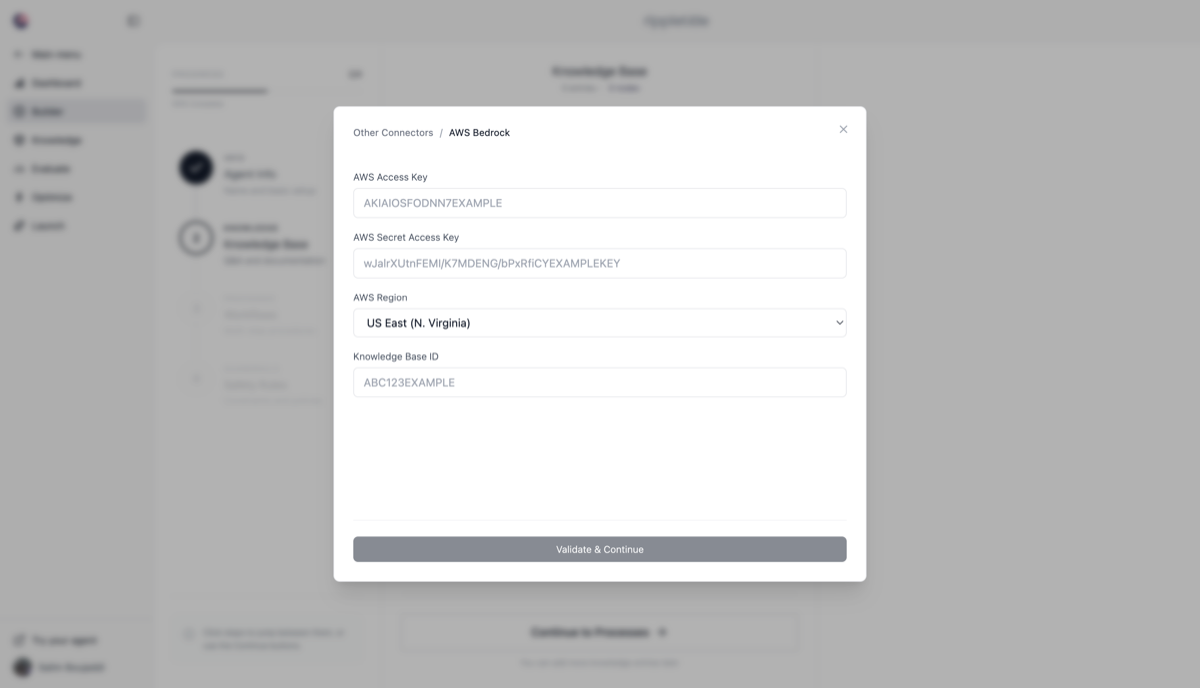 3. Enter your AWS credentials:
* **AWS Access Key**
* **AWS Secret Access Key**
* **AWS Region**
* **Knowledge Base ID**
4. Select the data sources you want to import and click **"Continue"**
## Step 4: Configure and Test
1. Once the import completes, your knowledge base is visualized as a graph in the **"Knowledge"** tab
2. Click **"Continue to Processes"** to define agent workflows
3. Click **"Continue to Guardrails"** to set up safety and compliance rules
4. Test your agent directly in Rippletide to validate responses
## Troubleshooting
### Connection Issues
* Verify your AWS credentials are correct and active
* Confirm the IAM user has the required Bedrock permissions listed above
* Check that the Knowledge Base ID exists in the specified region
* Make sure Amazon Bedrock is available in your selected AWS region
### Data Import Failures
* Verify the knowledge base contains at least one data source
* Ensure the knowledge base is in an **active** state in the Bedrock console
* Check AWS CloudWatch logs for detailed error messages
## Next Steps
* [Deploy your agent via MCP](/docs/trust-platform/integrations/mcp) to use it in Claude Desktop, Cursor, VS Code, and more
* Set up advanced guardrails for production-ready safety controls
* Monitor agent performance and usage analytics from the Rippletide dashboard
## Related Resources
* [AWS Bedrock Documentation](https://docs.aws.amazon.com/bedrock/)
3. Enter your AWS credentials:
* **AWS Access Key**
* **AWS Secret Access Key**
* **AWS Region**
* **Knowledge Base ID**
4. Select the data sources you want to import and click **"Continue"**
## Step 4: Configure and Test
1. Once the import completes, your knowledge base is visualized as a graph in the **"Knowledge"** tab
2. Click **"Continue to Processes"** to define agent workflows
3. Click **"Continue to Guardrails"** to set up safety and compliance rules
4. Test your agent directly in Rippletide to validate responses
## Troubleshooting
### Connection Issues
* Verify your AWS credentials are correct and active
* Confirm the IAM user has the required Bedrock permissions listed above
* Check that the Knowledge Base ID exists in the specified region
* Make sure Amazon Bedrock is available in your selected AWS region
### Data Import Failures
* Verify the knowledge base contains at least one data source
* Ensure the knowledge base is in an **active** state in the Bedrock console
* Check AWS CloudWatch logs for detailed error messages
## Next Steps
* [Deploy your agent via MCP](/docs/trust-platform/integrations/mcp) to use it in Claude Desktop, Cursor, VS Code, and more
* Set up advanced guardrails for production-ready safety controls
* Monitor agent performance and usage analytics from the Rippletide dashboard
## Related Resources
* [AWS Bedrock Documentation](https://docs.aws.amazon.com/bedrock/)