> ## Documentation Index
> Fetch the complete documentation index at: https://docs.rippletide.com/llms.txt
> Use this file to discover all available pages before exploring further.
# Overview
> Give Claude Code persistent memory, real-time rule enforcement, and team-wide governance
## The problem
Claude Code persists context via `CLAUDE.md` files. But this mechanism has two limits:
1. **It doesn't scale in size.** `CLAUDE.md` is injected into the system prompt, which means it eats into the context window. The more rules you add, the less room the agent has to work. The Context Graph stores knowledge externally and the agent queries only what it needs.
2. **It's siloed per engineer.** When one engineer defines coding rules in their agent, the rest of the team never sees them. Scale that to 10 engineers running parallel agents, and you get 10 diverging sets of conventions. Each agent "remembers," but none of them share.
## How Rippletide Code fixes this
Rippletide Code gives Claude Code persistent, structured memory backed by a Context Graph. Instead of re-explaining your conventions every session, you store them once. Every agent session reads from the same source of truth.
The graph stores your engineering standards:
* **Naming conventions** — `camelCase` for variables, `PascalCase` for components, `UPPER_SNAKE_CASE` for constants
* **Architectural patterns** — where to put hooks, how to structure API routes, which state management to use
* **Design system rules** — approved components, spacing tokens, color usage
* **Error handling policies** — how to handle API failures, logging standards, retry strategies
 ## What you get
Rippletide Code covers five areas:
| Capability | How it works |
| ------------------------------------------------------------ | ---------------------------------------------------------------------------------------------------------- |
| [**Setup**](/docs/coding-agents/connect) | One command to authenticate, scan your repo, select rules, and install hooks |
| [**Rule-guided coding**](/docs/coding-agents/coding-session) | Rules are injected into every Claude session automatically. Violations are blocked before code is written. |
| [**Rule management**](/docs/coding-agents/rule-management) | Add, edit, or delete rules using natural language — no config files to maintain |
| [**Rule sharing**](/docs/coding-agents/rule-sharing) | Share your rule set with teammates via email and OTP |
| [**Planning**](/docs/coding-agents/planning) | Generate implementation plans that are automatically reviewed against your rules |
## Integration
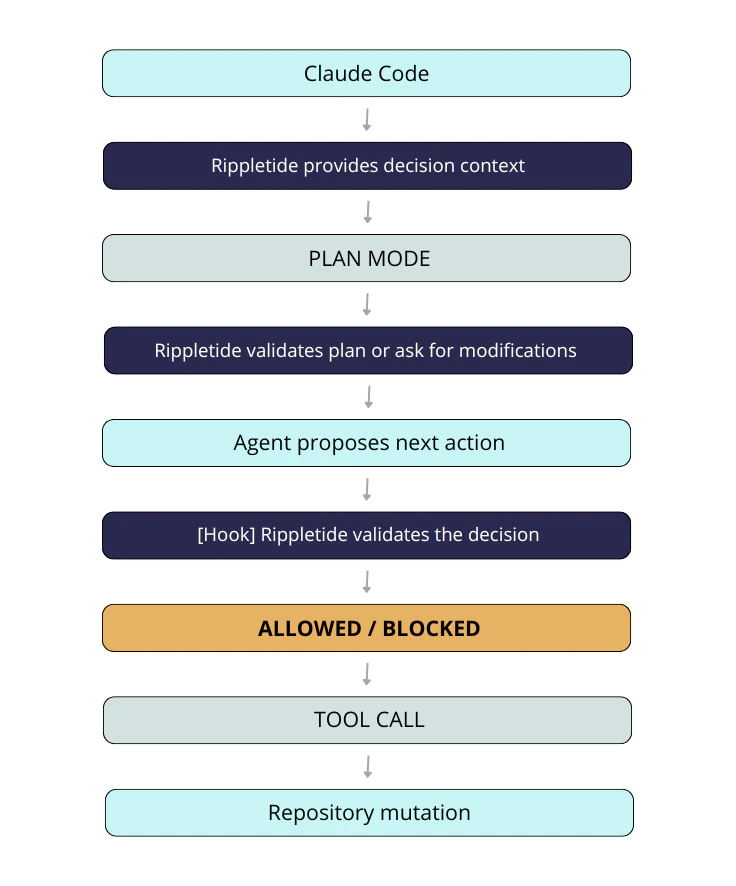
Rippletide integrates with Claude Code through [hooks](https://docs.anthropic.com/en/docs/claude-code/hooks) — shell commands that run automatically at key points during the agent session. The `connect` command sets up these hooks so the Context Graph is queried seamlessly, without any manual intervention.
Two hooks run during every coding session:
* **`fetch-rules.sh`** (UserPromptSubmit) — fires on every prompt, queries the backend with the user's request, and injects relevant rules into Claude's context
* **`check-code.sh`** (PreToolUse) — fires before every Edit/Write, sends the proposed code to the backend for violation checking, and blocks the tool call if violations are found
## Data privacy
Rippletide only relies on the context available inside your local Claude Code workflow:
* the current Claude Code chat session for the active project
* your `CLAUDE.md`
Your codebase is not centrally analyzed outside of your local Claude Code environment. The analysis happens through your own Claude Code setup.
Rippletide only stores the rules extracted from that context, not the rest of the project content. In practice, this means Rippletide keeps reusable conventions and policies, not your full codebase or unrelated session content.
## Next steps
Set up Rippletide Code in your project
How rules are enforced while you code
Add, edit, and delete rules with natural language
Share rules with teammates
Generate rule-compliant implementation plans
Scale conventions across engineers and repositories
## What you get
Rippletide Code covers five areas:
| Capability | How it works |
| ------------------------------------------------------------ | ---------------------------------------------------------------------------------------------------------- |
| [**Setup**](/docs/coding-agents/connect) | One command to authenticate, scan your repo, select rules, and install hooks |
| [**Rule-guided coding**](/docs/coding-agents/coding-session) | Rules are injected into every Claude session automatically. Violations are blocked before code is written. |
| [**Rule management**](/docs/coding-agents/rule-management) | Add, edit, or delete rules using natural language — no config files to maintain |
| [**Rule sharing**](/docs/coding-agents/rule-sharing) | Share your rule set with teammates via email and OTP |
| [**Planning**](/docs/coding-agents/planning) | Generate implementation plans that are automatically reviewed against your rules |
## Integration
Rippletide integrates with Claude Code through [hooks](https://docs.anthropic.com/en/docs/claude-code/hooks) — shell commands that run automatically at key points during the agent session. The `connect` command sets up these hooks so the Context Graph is queried seamlessly, without any manual intervention.
Two hooks run during every coding session:
* **`fetch-rules.sh`** (UserPromptSubmit) — fires on every prompt, queries the backend with the user's request, and injects relevant rules into Claude's context
* **`check-code.sh`** (PreToolUse) — fires before every Edit/Write, sends the proposed code to the backend for violation checking, and blocks the tool call if violations are found
## Data privacy
Rippletide only relies on the context available inside your local Claude Code workflow:
* the current Claude Code chat session for the active project
* your `CLAUDE.md`
Your codebase is not centrally analyzed outside of your local Claude Code environment. The analysis happens through your own Claude Code setup.
Rippletide only stores the rules extracted from that context, not the rest of the project content. In practice, this means Rippletide keeps reusable conventions and policies, not your full codebase or unrelated session content.
## Next steps
Set up Rippletide Code in your project
How rules are enforced while you code
Add, edit, and delete rules with natural language
Share rules with teammates
Generate rule-compliant implementation plans
Scale conventions across engineers and repositories